OMEGA geometry
This page outlines the geometry used in OMEGA, with focus on PET, SPECT and CT.
PET geometry
Transaxial
The figure below outlines the geometry of PET in the transaxial (XY) direction. One thing to note is that, if you’re using GATE data,
if you have sub-blocks in one block, you’ll need set this to options.transaxial_multip. In the figure below, the top right block
has two sub-blocks, but it is still considered as one single block. However, in this case options.transaxial_multip = 2. If you
don’t have sub-blocks, you only need the total number of blocks per ring. Ring means the transaxial view in this. For example, the figure
below has 3 blocks. When inputting your own sinograms, the row axis should have the radial distance and the column axis the angles.
This means that you should get horizontal “sine” curve. For Python, take note that the data needs to use Fortran data ordering, i.e. column
major ordering.
If you input your own detector coordinates, you don’t need to specify these. You can use any geometry you wish, but if the system doesn’t correspond to a cylindrical block-based PET scanner, you’ll need to input the detector coordinates manually. The built-in support for cylindrical PET scanners is simply more efficient than inputting the coordinates manually, when it is applicable. Again, there are no restrictions to the geometry if you input your own coordinates.
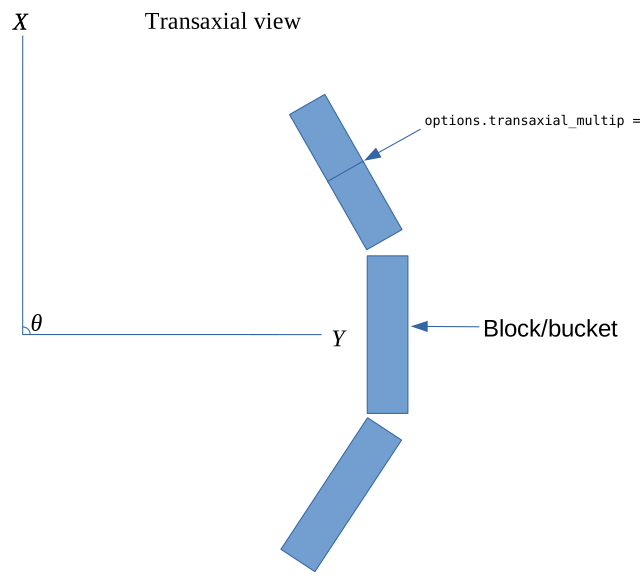
PET geometry in the transaxial view.
Axial
The figure below outlines the geometry of PET in the axial (XZ) direction. If you have more than one bucket axially, you’ll need to specify
options.linear_multip. The options.cryst_per_block_axial multiplied with options.linear_multip should equal the number of crystal
rings. In the below figure options.linear_multip = 2 and options.blocks_per_ring = 8. If the blocks have gaps between them, you can take
these into account automatically by setting options.ringGaps such that it contains the crystal rings after which there is a gap. For example,
if blocks would have options.cryst_per_block_axial = 20 then options.ringGaps = 20.
Again, if you use your own coordinates you only need to input them. None of the above are needed when using custom detector coordinates.
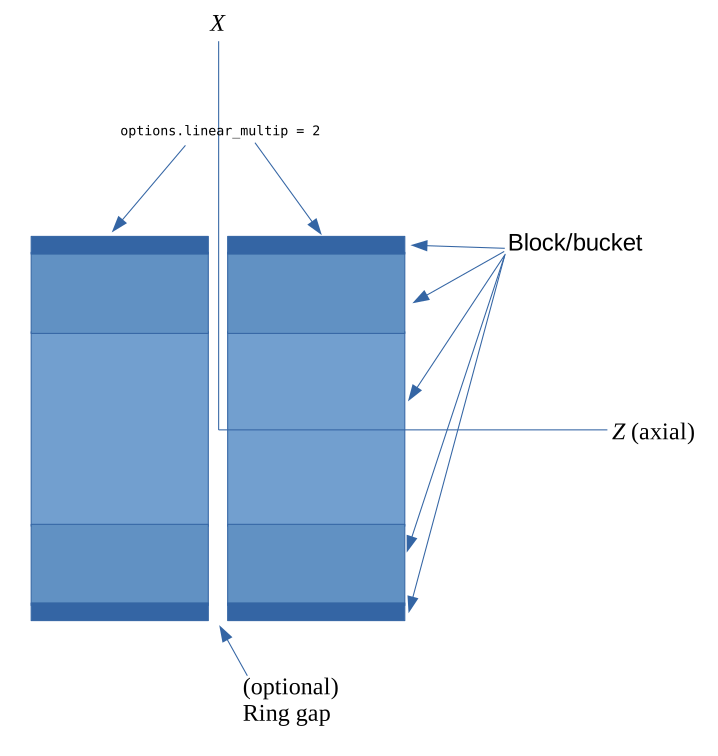
PET geometry in the axial view.
CT/SPECT geometry
Transaxial
CT and SPECT geometries don’t differ from each other. The rotation angle is denoted with θ and the rotation is generally assumed to be clockwise.
What is important is that when you visualize the projection images, the rotation directed downwards. This applies to both MATLAB/Octave and Python.
For Python, take note that the data needs to use Fortran data ordering, i.e. column major ordering. options.nRowsD should contain the number of
rows in each projection.
For CT, it is also possible to input your own custom detector coordinates. However, in this case you won’t be able to use projector type 5 or the voxel-based backprojection of projector type 4. This means that aliasing artifacts can appear. In this case, again, you can ignore all parameters except for FOV size and the number of voxels per axis.
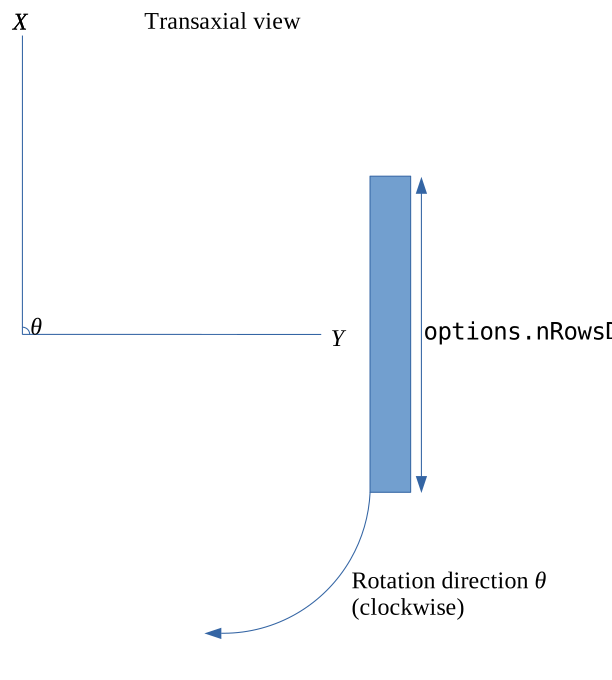
CT/SPECT geometry in the transaxial view.
For CT, it is also possible that the panel is rotated in the transaxial plane with respect to the center of the panel. The figure below outlines
such a case. You can take this into account by inputting α as the first column of options.pitchRoll. It can be either a scalar or a vector.
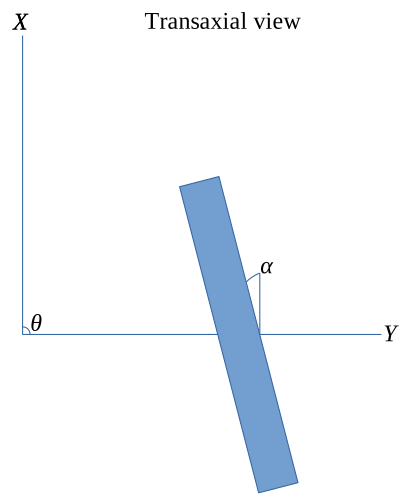
CT/SPECT geometry in the transaxial view with rotation.
Axial
Again, CT and SPECT geometries don’t differ here except that CT supports panel rotation along the angle β, as outlined in the below figure.
You can include this angle as the second column of options.pitchRoll. Note that, if you have non-zero α but zero β, then the second column
of options.pitchRoll has to be zeros. Same applies the other way around.
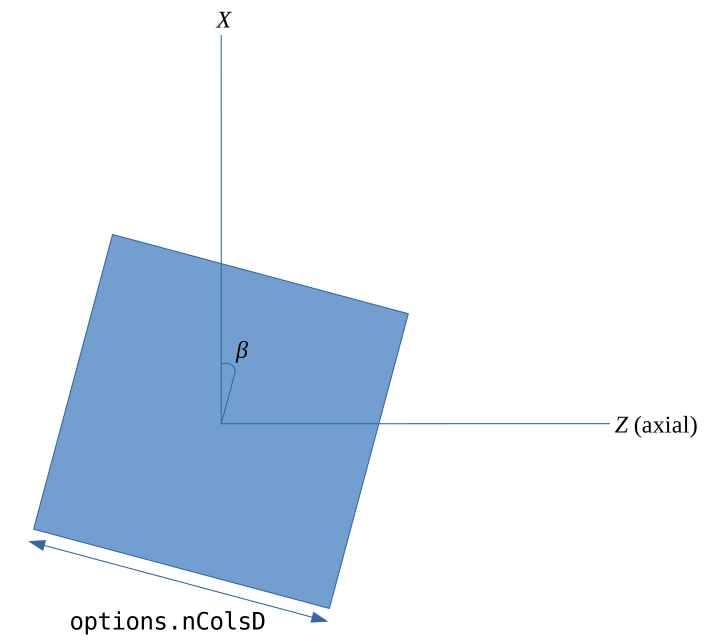
CT/SPECT geometry in the axial view.
Any data
Any data can also be used, if you input your own custom detector coordinates, or source-detector pairs, depending on the setup. In such a case,
you only need to input the FOV sizes and the number of voxels per axis in the final image. Optionally also the object offsets (for example
options.oOffsetX) if you wish to move the image volume from the origin (the volume is always by default centered on the origin).
options.x should include the source coordinates for the X, Y and Z directions, and the detector coordinates for X, Y and Z, for EACH measurement.
This means that a total of 6 coordinates are needed per ONE measurement. For Python, these need to be Fortran-ordered (column major).