OMEGA geometry
This page outlines the geometry used in OMEGA, with a focus on PET, SPECT, and CT.
PET geometry
All the projectors in OMEGA for PET are ray-based. Since in PET we are computing probabilities, rather than just the lines of intersection, we need the whole length of the ray as well.
By default, the probability is computed using the whole length of the ray from one detector to the other. However, it is possible to instead compute the probability based on the
length of the ray inside the field-of-view (FOV) only. This can be enabled by setting options.useTotLength = false (False in Python).
Transaxial
The figure below outlines the geometry of PET in the transaxial (XY) direction. One thing to note is that, if you’re using GATE data,
and you have sub-blocks in one block, you’ll need to set their number to options.transaxial_multip. In the figure below, the top right block
has two sub-blocks, but it is still considered as one single block. However, in this case options.transaxial_multip = 2. If you
don’t have sub-blocks, you only need the total number of blocks per ring. Note that this is required only when loading GATE data with OMEGA.
Ring refers to the transaxial view here. For example, the figure
below has 3 blocks. When inputting your own sinograms, the row axis should have the radial distance, and the column axis the angles.
This means that you should get a horizontal “sine” curve. For Python, note that the data needs to use Fortran data ordering, i.e. column
major ordering.
If you input your own detector coordinates, you don’t need to specify these. You can use any geometry you wish, but if the system doesn’t correspond to a cylindrical block-based PET scanner, you’ll need to input the detector coordinates manually. The built-in support for cylindrical PET scanners is simply more efficient than inputting the coordinates manually when it is applicable. Again, there are no restrictions on the geometry if you input your own coordinates.
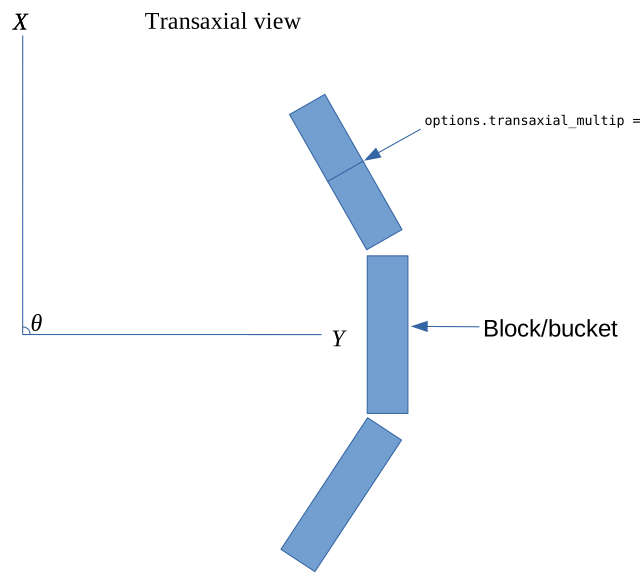
PET geometry in the transaxial view.
Axial
The figure below outlines the geometry of PET in the axial (XZ) direction. If you have more than one bucket axially, you’ll need to specify
options.linear_multip. options.cryst_per_block_axial multiplied by options.linear_multip should equal the number of crystal
rings. In the figure below, options.linear_multip = 2 and options.blocks_per_ring = 8. If the blocks have gaps between them, you can take
these into account automatically by setting options.ringGaps such that it contains the gaps between each ring (in millimeters). For example,
if you have options.linear_multip = 4 then options.ringGaps should contain three gap values if there are gaps. The gaps are always
assumed to be zero by default.
Again, if you use your own coordinates, you only need to input them. None of the above is needed when using custom detector coordinates.
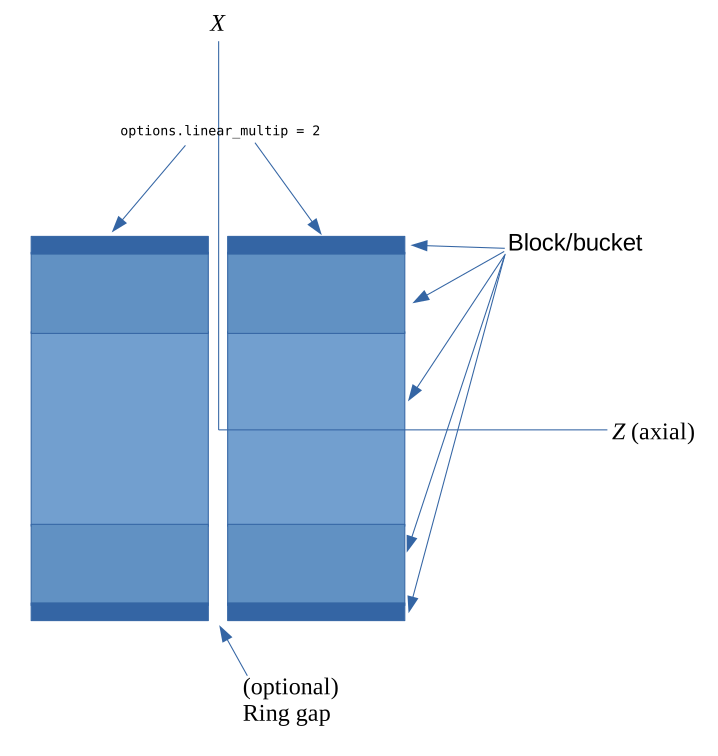
PET geometry in the axial view.
CT/SPECT geometry
Transaxial
CT and SPECT geometries don’t differ from each other. The rotation angle is denoted with θ and the rotation is generally assumed to be clockwise.
What is important is that when you visualize the projection images, the rotation is directed downward. This applies to both MATLAB/Octave and Python.
For Python, note that the data needs to use Fortran data ordering, i.e. column major ordering. options.nRowsD should contain the number of
rows in each projection.
For CT, it is also possible to input your own custom detector coordinates. However, in this case you won’t be able to use projector type 5 or the voxel-based backprojection of projector type 4. This means that aliasing artifacts can appear. In this case, again, you can ignore all parameters except for FOV size and the number of voxels per axis.
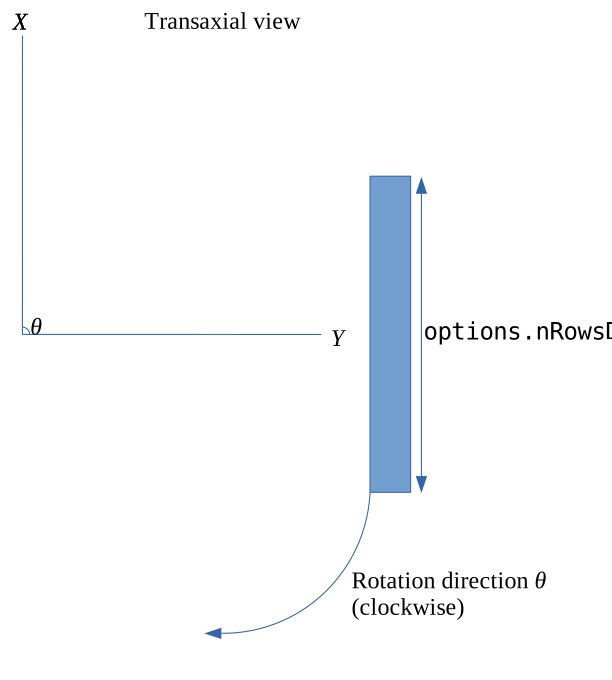
CT/SPECT geometry in the transaxial view.
For CT, it is also possible that the panel rotates in the transaxial plane with respect to the center of the panel. The figure below outlines
such a case. You can take this into account by inputting α as the first column of options.pitchRoll. It can be either a scalar or a vector, where
a vector should contain a value for ALL projections. A scalar uses the same value for all projections.
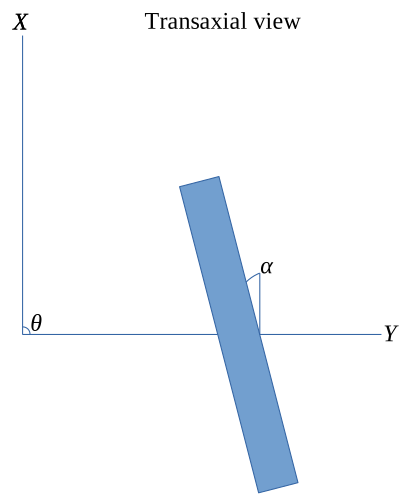
CT/SPECT geometry in the transaxial view with rotation.
Axial
Again, CT and SPECT geometries don’t differ here except that CT supports panel rotation along the angle β, as outlined in the figure below.
You can include this angle as the second column of options.pitchRoll. Note that if you have non-zero α but zero β, then the second column
of options.pitchRoll has to be zeros. The same applies the other way around. options.nColsD should contain the number of
columns in each projection.
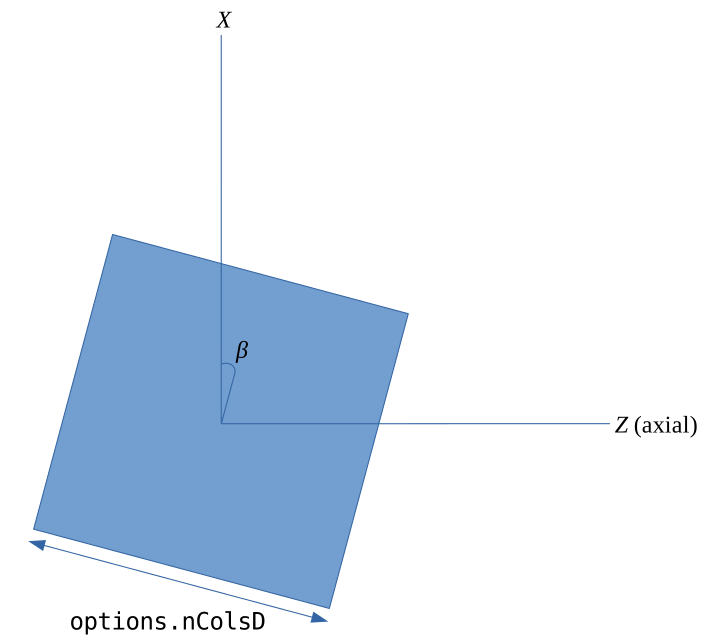
CT/SPECT geometry in the axial view.
Fan beam CT data
While OMEGA inherently assumes a cone beam data format, a fan beam can also be used. When using fan beam data, the input projections should essentially be 1D slices, for example of size numberOfRowsX1XnumberOfProjections (or number of columns; the only thing that is important is that either of these has the dimension of 1). If the fan beam source moves axially, you can input these as additional projections. The source and center of the 1D slice coordinates have to be input for all projections/combinations (i.e. the coordinates for source and detector centers). Pure 2D reconstruction is not possible as the axial/z-direction has to be defined at all times, but the axial/z-direction can have only one slice or be extremely thin. A 3D reconstruction using 2D fan beam (for example, a spiral CT with a flat panel) is not optimized computationally and thus can be slower than expected.
Parallel beam CT data
Parallel beam CT data can also be used, but it requires the input data to be in projection format as with CBCT data. The only difference with the parallel beam is that the source is always assumed to move exactly like the detector pixels. This means that you need to input the coordinates of the center of the source and detector panels, and both the source and detector pixels always move identically. This means that when moving from the center to a corner pixel in the detector panel, the source is also moved by the exact same amount. If the center coordinates are exactly perpendicular, the resulting coordinates will be perpendicular too. This assumes that the detector pixels/source are always moved as defined by the size of one detector pixel. If there is variation in the shifts, that cannot be taken into account at the moment, meaning that shifts have to be constant and fixed for each projection. There can be a difference in the row and/or column directions though.
Use parallel beam setup by setting options.useParallelBeam to true.
Helical CT data
Helical CT is supported for curved cylindrical scanners. Spherical scanners are not supported at the moment, but they can be easily supported if necessary. For helical CT data, the format is almost identical to cone beam case. The axial coordinates simply move with helical data, but the transaxial and axial coordinates are input the same as with cone beam data. α and β are not supported with helical CT. For helical CT data, the rotation angles θ have to be given. Flying focal spot can be freely used as long as it is taken into account in the source coordinates.
For helical data, you might need to increase the number of subsets to get everything working, especially if you are using AMD or Intel hardware.
Use helical setup by setting options.useHelical to true.
Note
Current support for curved detector helical CT is still preliminary and is suboptimal.
Other data
Other types of data can also be used, if you input your own custom detector coordinates or source-detector pairs, depending on the setup. In such a case,
you only need to input the FOV sizes and the number of voxels per axis in the final image. Optionally, also the object offsets (for example
options.oOffsetX) if you wish to move the image volume from the origin (the volume is always by default centered on the origin).
options.x should include the source coordinates for the X, Y and Z directions, and the detector coordinates for X, Y, and Z for EACH measurement.
This means that a total of 6 coordinates are needed per ONE measurement. For Python, these need to be Fortran-ordered (column major). For more information
on the custom detector coordinate setup, see Using your own source/detector coordinates or list-mode data.